Selected text.
Source attached.
Prompt ready.
A local-first Mac app for capturing text with its sources and building prompts for AI assistants.
This download is not notarized by Apple. macOS may block the first opening. Read installation guidance.
Download for Mac7-day free trial · macOS 13+ · Apple silicon

Actors isolate shared mutable state.
SOURCE APP Safari
TITLE The Swift Programming Language
ORIGIN docs.swift.org
Explain how actor isolation changes access to shared state.
- Storage
- Local JSON
- Formatting
- Markdown
- Budget
- Visible
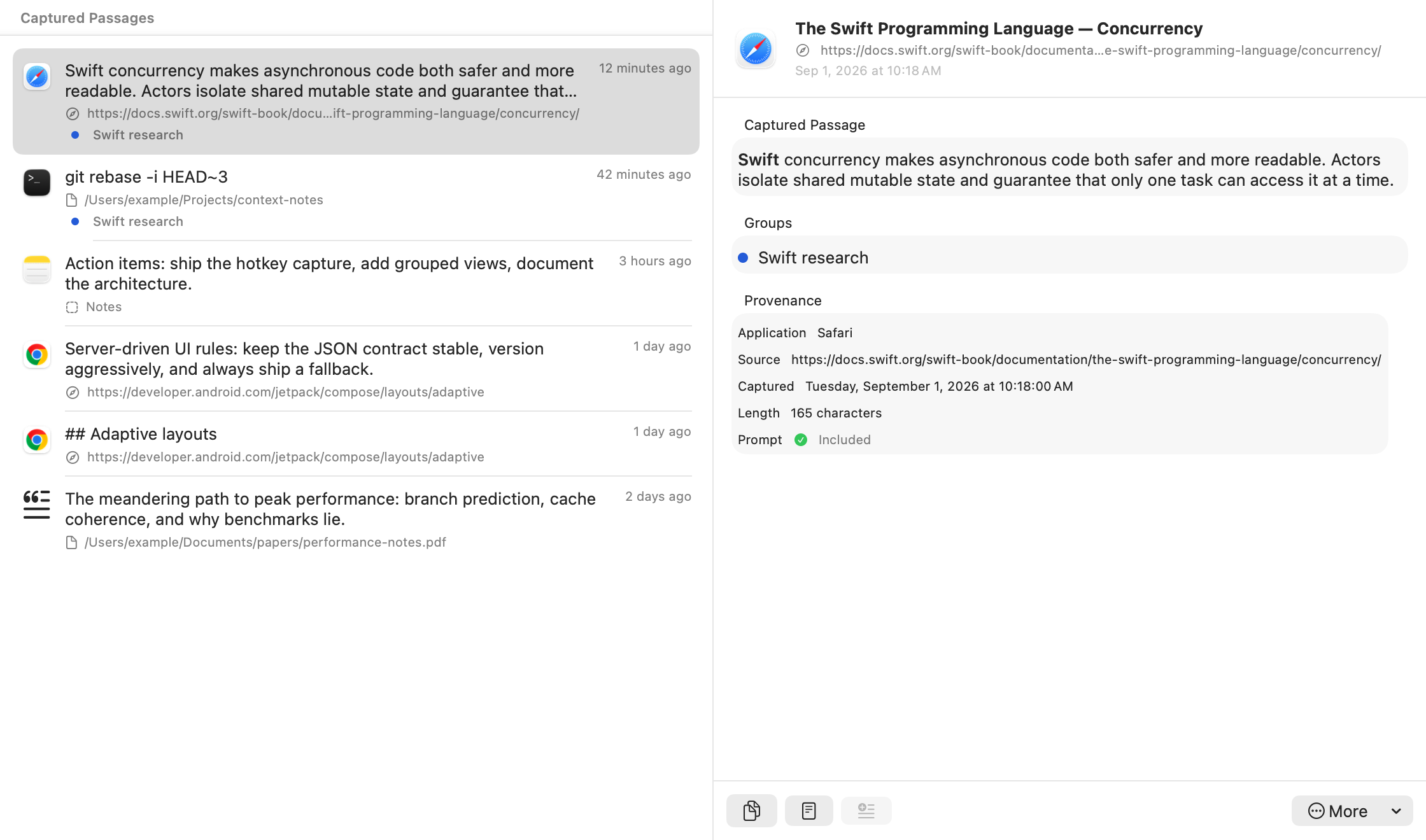
12.4 — PRODUCT VIEW
The interface keeps the evidence in view.
Explore the library and a selected passage with its provenance. This view uses PromptCTX’s native library rows and passage detail with example content.
28.0 — LINE OF CUSTODY
Using PromptCTX
The current build requires an Apple silicon Mac with macOS 13 or later. Allow Accessibility access in System Settings → Privacy & Security so PromptCTX can capture selected text.
-
01
Capture
Select a useful passage in another Mac app. Press the default shortcut, Control + Option + Command + C, to save it. You can change the shortcut in Settings.
TEXT ACQUIRED -
02
Preserve
PromptCTX keeps the source app and, when exposed, the page URL and title or local file path. Browser Automation permission is optional for source metadata; text still saves without it. Supported rich text becomes Markdown.
ORIGIN ATTACHED -
03
Compose
Add selected captures to a prompt. Reorder them, add notes and instructions, and trim as needed. Use Copy Prompt to paste into your chosen assistant, or Export to save a file to share with it.
PROMPT READY
43.7 — CONTEXT ASSEMBLY
Useful context has structure.
Provenance, Markdown, and an estimated token budget help you shape the prompt. The count is a guide, not a guarantee that it fits your chosen model. Example below.
“Actors isolate shared mutable state.”
- APP
- Safari
- HOST
- docs.swift.org
## Actor isolation

**Actors** protect shared state.

- explicit boundaries
- safer accessCompare these sources. Explain the design trade-offs and cite each origin.
71.2 — LOCAL BOUNDARY
Your library stays on your Mac.
PromptCTX stores captures locally. Activation and update checks use the network; captures are not sent. It has no accounts, analytics, or cloud sync. Copy and export let you take chosen content to another tool. What you paste or upload there is subject to that destination’s privacy practices.
- LIBRARY
- Local JSON
- APP NETWORK REQUESTS
- Activation & updates
- ACCOUNT
- None
- CLOUD SYNC
- None
89.0 — ONE-TIME PURCHASE
One purchase. No account. No subscription.
PromptCTX is a €19 one-time purchase. The current build supports Apple silicon Macs running macOS 13 or later.
SALES OPEN
Before you buy: this download is not notarized by Apple. macOS may block the first opening. Read installation guidance.
Secure one-time checkout through Stripe.
7-day free trial from first launch. A license is required after the trial. No automatic charge.
Installation guidance
Open the downloaded disk image and drag PromptCTX onto the Applications folder shortcut. Then open PromptCTX from Applications. If macOS blocks PromptCTX, and you trust the download, first try opening the app. Then open System Settings → Privacy & Security and use Open Anyway for PromptCTX, if available. Confirm Open in the next prompt. Managed Macs may prevent this exception. Do not override a warning that the app is damaged or will harm your Mac. Apple’s opening guidance.
Already purchased? Get your license.
- macOS 13+
- Apple silicon
- Local storage